PRIMAKON PCM
Primakon PCM: project management with AI.
For companies, project teams and project managers seeking less administration and better control of finances, communication, risks and issues. PCM connects project records with AI meeting transcription, recognition of key decisions, meeting minutes and proposals for future meetings.
A meeting that moves work forward.
Review the delivery schedule before the next coordination meeting.
Has the revised deadline been confirmed?
Illustrative workflow with sample data.
WHO PCM IS FOR
Less administration across the whole project.
From the organisation’s financial overview to the project manager’s next action: connect information and keep the team working in the same context.
Companies and organisations
A shared view of projects, contracts and financial progress, with workflows and access rights adapted to the organisation.
Project managers
Less manual administration and clearer control of communication, risks, issues, decisions and responsibilities.
Project teams
Meetings, documents and open questions belong to their project, giving agreements context and a clear next action.
Productivity
Less repeated data entry, information searching and manual preparation of meeting minutes.
Reliability
One project context for contracts, documents, responsibilities and open questions.
Compliance support
Defined workflows, access rights and user approval of AI suggestions support internal controls.
PM AI ASSISTANT
Less administration.
More time to lead projects.
AI works alongside project workflows. Suggestions stay reviewable, and the user decides what becomes an official record.
Ask in project context
Ask about one or several selected projects. The assistant prepares answers from available project data within the user’s access rights.
From discussion to minutes
AI automatically transcribes a recorded or uploaded meeting and identifies summaries, decisions, actions, risks and open questions. It prepares minutes that you can review, edit and export as a PDF.
From suggestions to actions
AI suggests risks, issues and information for new projects or contracts. The user reviews and confirms suggestions before records are created.
Context for the next meeting
AI prepares a next-meeting proposal using open questions and available information from the previous meeting. Continue the conversation with clear context and less manual preparation.
Financial questions, connected sources
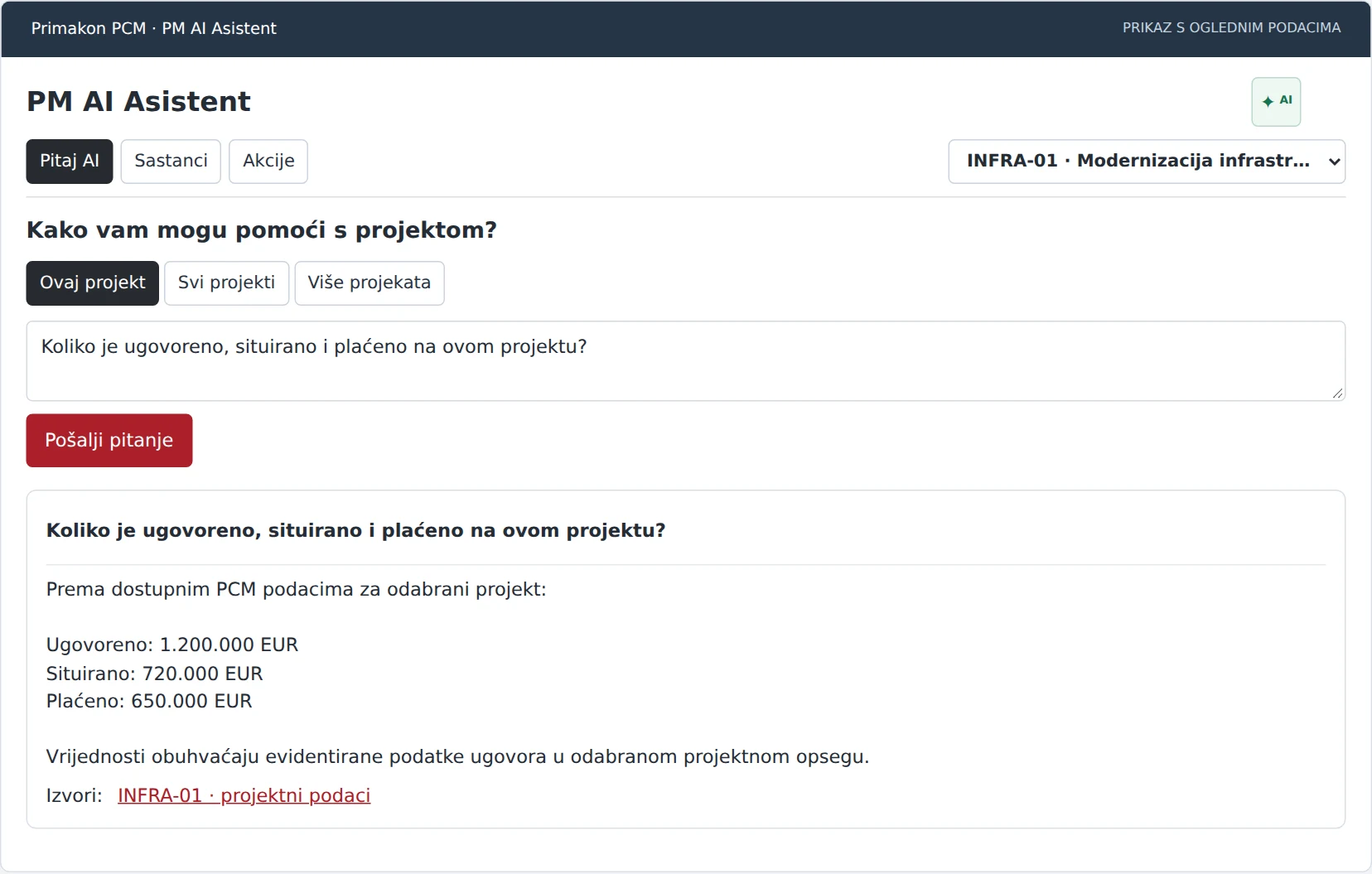
Ask about contracted, certified or paid amounts within your selected project scope. The answer connects available financial data with its sources.
From a contract PDF to a draft
Prepare suggested key information from a contract PDF. Check proposed values against the source before creating a contract and document.
User confirmation before creating records. Saved requests can wait for AI processing when the service is temporarily unavailable.
AI MEETING WORKFLOW
The discussion becomes a record. The record drives the next action.
Automatic transcription, recognition of key elements, prepared minutes and context for the next meeting significantly reduce project administration.
- 01
Record or upload the meeting
Keep the discussion as a source for further processing.
- 02
AI creates a transcript
Automatic transcription reduces the need for manual notes.
- 03
Identifies the key elements
Decisions, actions, risks, issues and open questions are extracted for review.
- 04
Connects agreements with the project
Review and confirm proposed records before saving them in the relevant project context.
- 05
Prepares minutes and the next meeting
Edit and export prepared minutes, and use a next-meeting proposal based on the previous discussion.
A LOOK AT THE INTERFACE
Ask a business question. Find the project context.
Contracted, certified and paid values in the selected scope, with references to project sources. The assistant uses the access rights of the user asking the question.
CONNECTED WORKFLOWS
Built for the work your team actually does.
Finances, contracts and quantities
Connect contracts, amendments, bills of quantities and monthly payment certificates. Review contracted, certified and paid amounts in the same project context.
Workflows and accountability
Ball-in-Court logic identifies who needs to act next. Coordinate approvals, deadlines and participant responsibilities.
Communication, issues and documents
Connect communication, open issues and documents with their project or contract. Participants share context, status information and clear responsibility for the next action.
Risks and issues
Track risks, open issues and required actions. Review suggestions from meeting analysis before adding them to a project.
Modules for your processes
Adapt fields and modules to your organisation: EU projects, reimbursement requests, indicators and cash flow plans.
Information for decisions
Status views and data exchange with Excel and BI tools connect operational detail with the wider project.
INTEGRATIONS
Standalone.
Connected when you need it.
PCM works as a standalone system. Integration with Oracle Primavera P6 connects contract and quantity data with the project schedule. It can also connect to other systems according to your needs: ERP, document management, digital signatures, GIS and business intelligence.
QUESTIONS & ANSWERS
Clear answers before your next step.
Who the system is for, how it works and how it connects to your organisation.
Who is Primakon PCM designed for?
PCM is designed for companies, organisations, project teams and project managers seeking less project administration and connected finances, communication, risks, issues and documents.
Which administrative tasks does PCM simplify?
PCM connects project records, contracts, documents, open issues and responsibilities. AI helps process meetings, extract important agreements, prepare minutes and propose subsequent meetings, reducing repeated entry and manual searches.
How does PCM support project financial management?
It connects contracts, amendments, bills of quantities and monthly payment certificates in one project context. Views of contracted, certified and paid amounts support financial monitoring, and AI answers can connect financial information with its sources.
How does AI meeting transcription and analysis work?
Record a meeting or upload a recording. AI automatically transcribes and analyses the discussion, extracting summaries, decisions, actions, risks, issues and open questions. It prepares minutes for review, editing and PDF export.
How are decisions, risks and issues recorded in the project?
Meeting analysis provides key elements and proposed project records. The user reviews and confirms proposals before records are created, accelerating administration while retaining control of official information.
Can PCM prepare the next meeting?
Yes. AI prepares a next-meeting invitation proposal using open questions and available information from the previous meeting, helping teams continue with context and less manual preparation.
Does PCM require Oracle Primavera?
No. PCM works as a standalone system. Integration with Oracle Primavera P6 connects contract and quantity information with the project schedule, and other business systems can be connected according to organisational needs.
Which other systems can PCM integrate with?
Depending on available interfaces and implementation needs, PCM can connect to ERP, document management, digital signatures, GIS and business intelligence. The integration scope is agreed for each organisation.
LET’S START WITH YOUR PROCESS
See how it fits your team.
Tell us where work slows down. Together we can define the right solution and implementation scope.
Arrange a product demo